Trimm App Tutorial: Streamline Your GLP-1 Therapy
Learn to use the Trimm app to simplify your GLP-1 therapy management with step-by-step installation, configuration, tracking, and analytics.

Estimated reading time: 11 minutes
Key Takeaways
- Centralize your GLP-1 therapy data—reminders, side effects, weight trends, and sites—into one intuitive app.
- Streamline dose scheduling and reminders to boost adherence and prevent missed injections.
- Track symptoms, weight, and injection sites to generate actionable reports for you and your healthcare provider.
- Customize goals, alerts, and lifestyle tags for personalized monitoring and pattern detection.
- Leverage advanced features like wearable integration, meal logging, and PDF exports to optimize therapy management.
Table of Contents
- 1. Overview of the Trimm App
- 2. Step-by-Step Setup Guide
- 3. Detailed Walkthrough of Using the Trimm App
- 4. Advanced Features & Tips
- 5. Summary & Next Steps
1. Overview of the Trimm App
Trimm is a digital companion built to turn complex GLP-1 therapy plans into a clear, manageable routine. With intuitive scheduling and comprehensive tracking, it helps you stay on time with injections, record side effects, and monitor key health metrics—all from one dashboard.
- Medication reminders & titration logs: Weekly or daily alerts and a complete history of dose changes.
- Symptom & side-effect tracking: Log nausea, GI upset, fatigue, and more in real time. See our GLP-1 side effects guide for tips.
- Weight & body metrics: Chart your weight, BMI, and waist measurements over weeks and months. Learn more about how to tell if you are at a healthy weight.
- Injection site rotation: Prevent irritation by rotating abdomen, thigh, and arm sites. Learn more in the injection site guide.
- Report generation: Export PDF or Excel summaries for your healthcare team.
2. Step-by-Step Setup Guide
Step 1: Installation & Account Creation
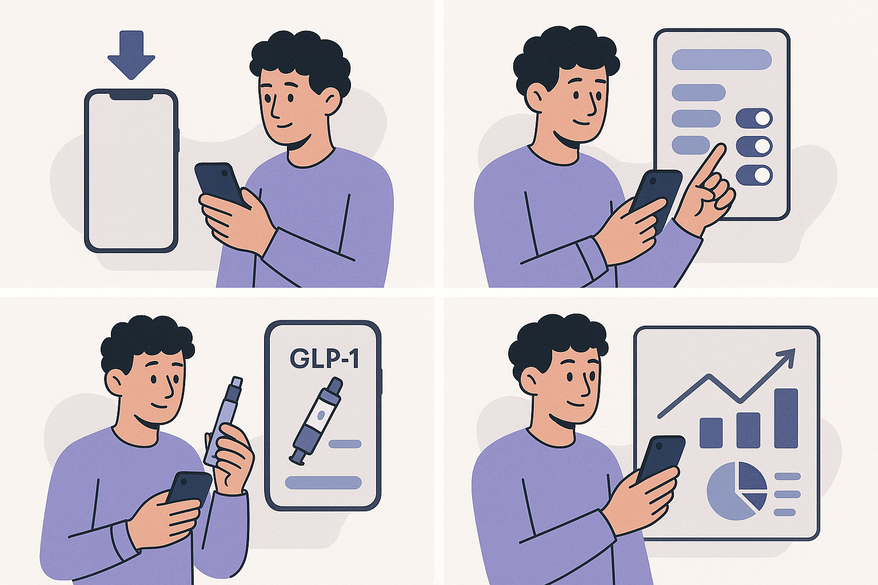
- Download the Trimm app from the App Store or Google Play.
- Sign up with your email, choose a password, and verify your account.
- Enable push notifications and grant health-data access (Apple Health or Google Fit).
Step 2: Initial Configuration for GLP-1 Therapy
- Add your GLP-1 medication (semaglutide, tirzepatide) under “Medications.” See our definitive guide to GLP-1 weight loss medications for more details.
- Enter your start date, titration schedule, injection day, and time.
- Sync or manually input baseline data: current weight and target goals.
- Double-check entries against your prescription label or provider instructions.
3. Detailed Walkthrough of Using the Trimm App
Step 3: Personalize Your Tracking
- Set weight and adherence goals; configure critical and wellness alerts.
- Log each injection’s dose, site (abdomen, thigh, arm), and any side effects.
- Use notes to document missed doses, travel, or unusual reactions.
Step 4: Monitor Progress & Analyze Data
- Review your dashboard for adherence rates, weight trends, and symptom timelines.
- Use charts to discuss dose adjustments or plateaus with your provider. Check out trend analysis tips.
- Export reports and share PDFs in clinical visits for more productive discussions.
- Safety note: Always consult your healthcare provider before changing doses.
4. Advanced Features & Tips
- Wearable integration: Sync steps, sleep, and heart-rate data. Learn about GLP-1 tracking wearable compatibility for better outcomes.
- Meal logging: Correlate food intake with appetite and weight changes.
- Custom tags: Mark stress, illness, or travel events for clearer patterns.
- Weekly reviews: Spend 5–10 minutes reviewing charts to catch early trends.
- PDF exports: Generate clinician-ready summaries in seconds.
Troubleshooting:
- Missed notifications: Check app permissions and app updates.
- Timestamp errors: Verify device clock and time zone settings.
- Titration confusion: Use built-in templates or confirm schedules with your provider.
5. Summary & Next Steps
- Install Trimm and set up your account.
- Configure your GLP-1 medication, schedule, and baseline metrics.
- Customize goals, reminders, and detailed logs.
- Monitor trends, export reports, and consult your provider as needed.
- Explore advanced features like wearable sync and meal logging for deeper insights.
Your next steps: verify your therapy plan, align the app with your prescription, and plan a follow-up to review app-generated data.
FAQ
- How do I add my GLP-1 medication? Tap “Medications,” select “Add Medication,” choose your GLP-1 drug, or enter it manually if not listed.
- Can I export my data? Yes. Go to “Reports,” select PDF or Excel, and share the summary with your healthcare team.
- What if I miss a dose? Log it immediately in the app’s notes and adjust your schedule following provider guidance.